A keyboard driver, rebuilt for the browser, and the version before it that never worked.
The official driver for my AULA F87 PRO keyboard is no longer updated, and it looks it. Over five days I worked with Claude to replace it with a web page. Claude did the reverse engineering and wrote the code. I decided what the driver should do, what it must never do, and how it should feel to use.
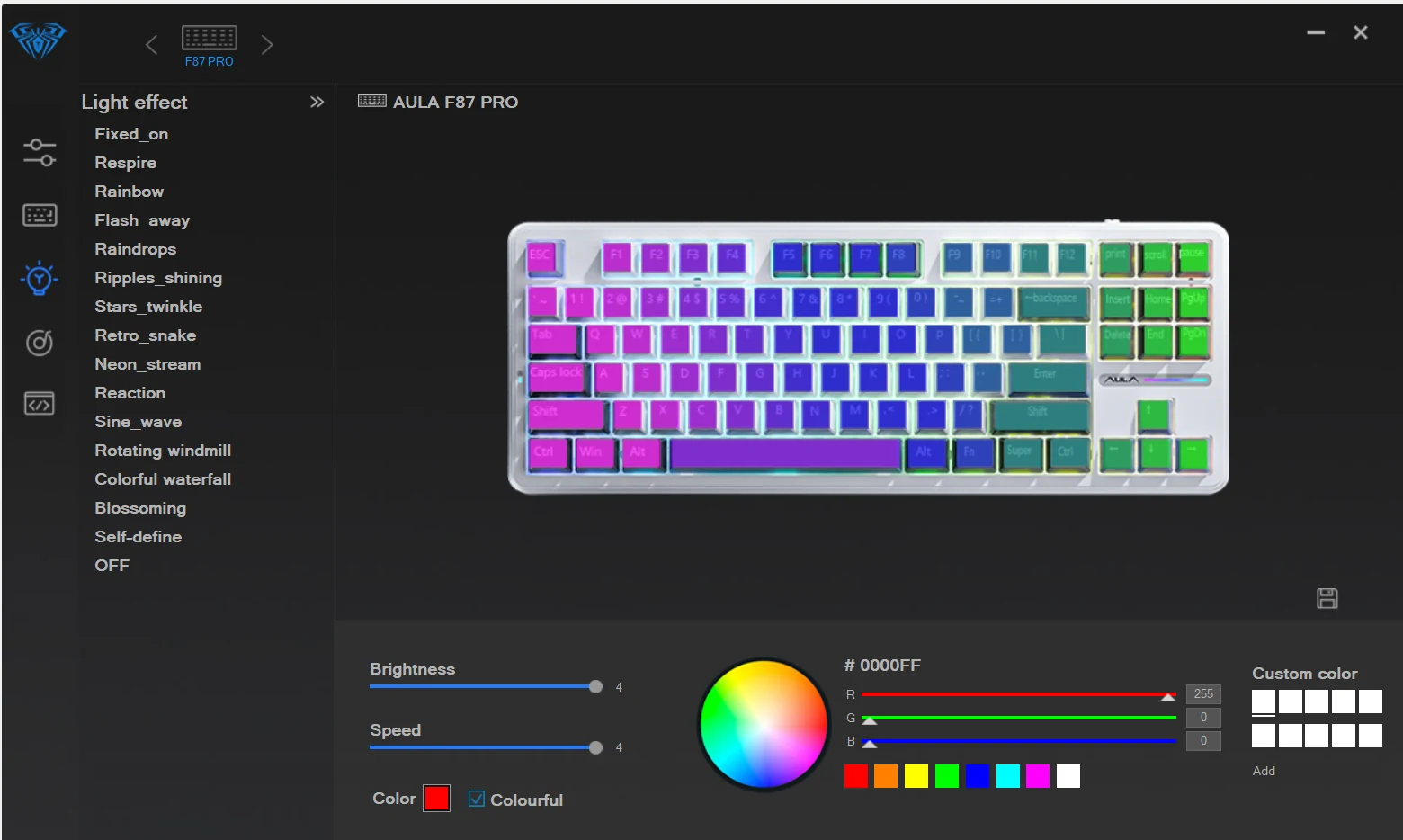
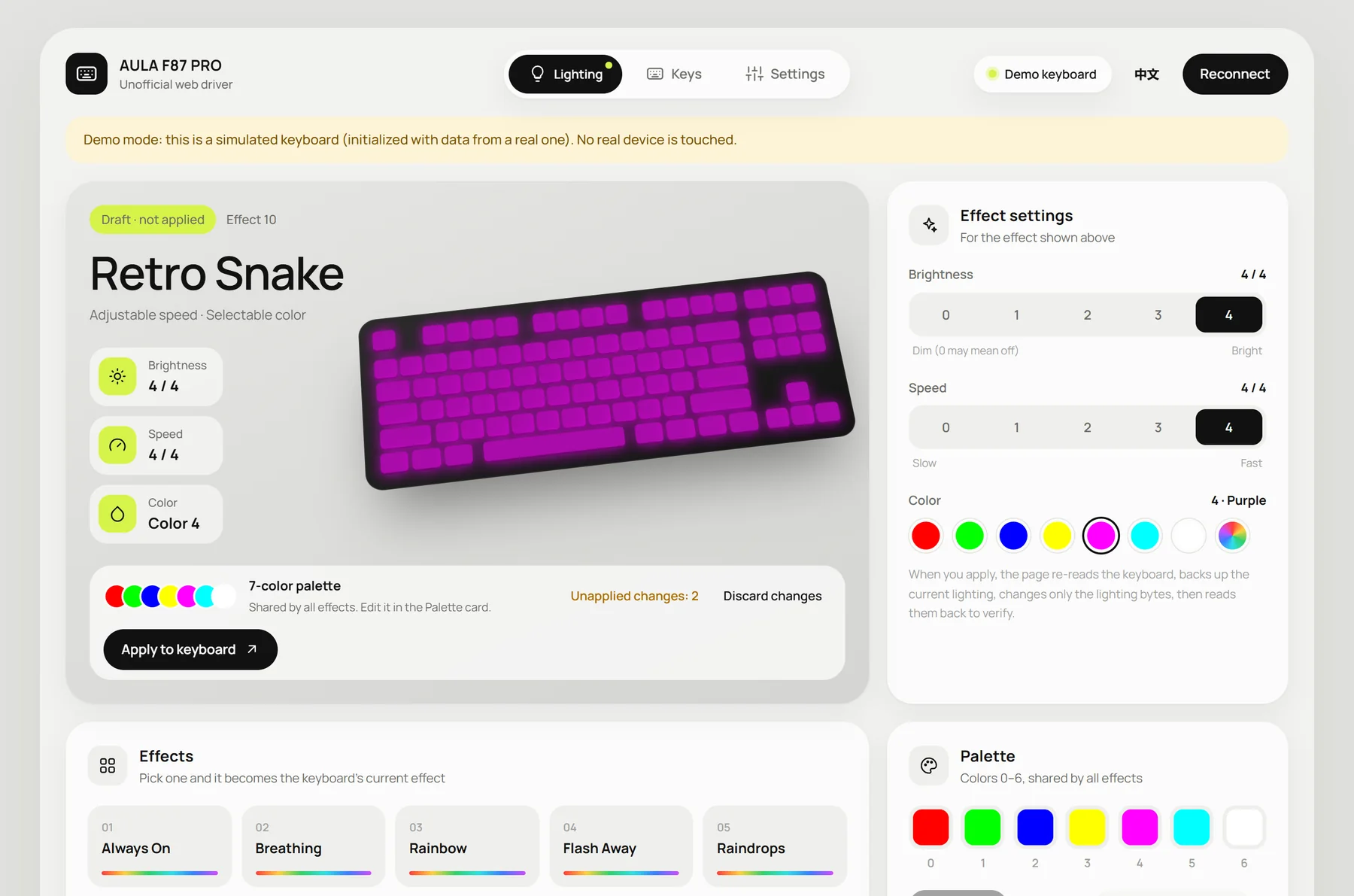
Fig. 01Before and after. Left, the official driver’s lighting page. Right, mine, with two changes waiting: nothing has been written to the keyboard yet, and the page says so in three places.
- Picked the problem: a driver I use, abandoned and hard to read
- Decided the scope, one feature at a time: six kept, the rest left out
- Signed off the safety rules every write has to follow
- Reviewed the interface and asked for it to look good, not just work
- Ran the tests that needed the real keyboard
- Reverse-engineered the official driver’s protocol
- Wrote the driver, the simulated keyboard and 49 unit tests
- Built the three pages and their English and Chinese text
The official driver works. It just never tells you what it did.
AULA’s Windows app does its job, but it was built to show every option the keyboard has, not to help you change one with confidence.
Before writing any code I listed what bothered me as a user. Each point became a rule for the new version.
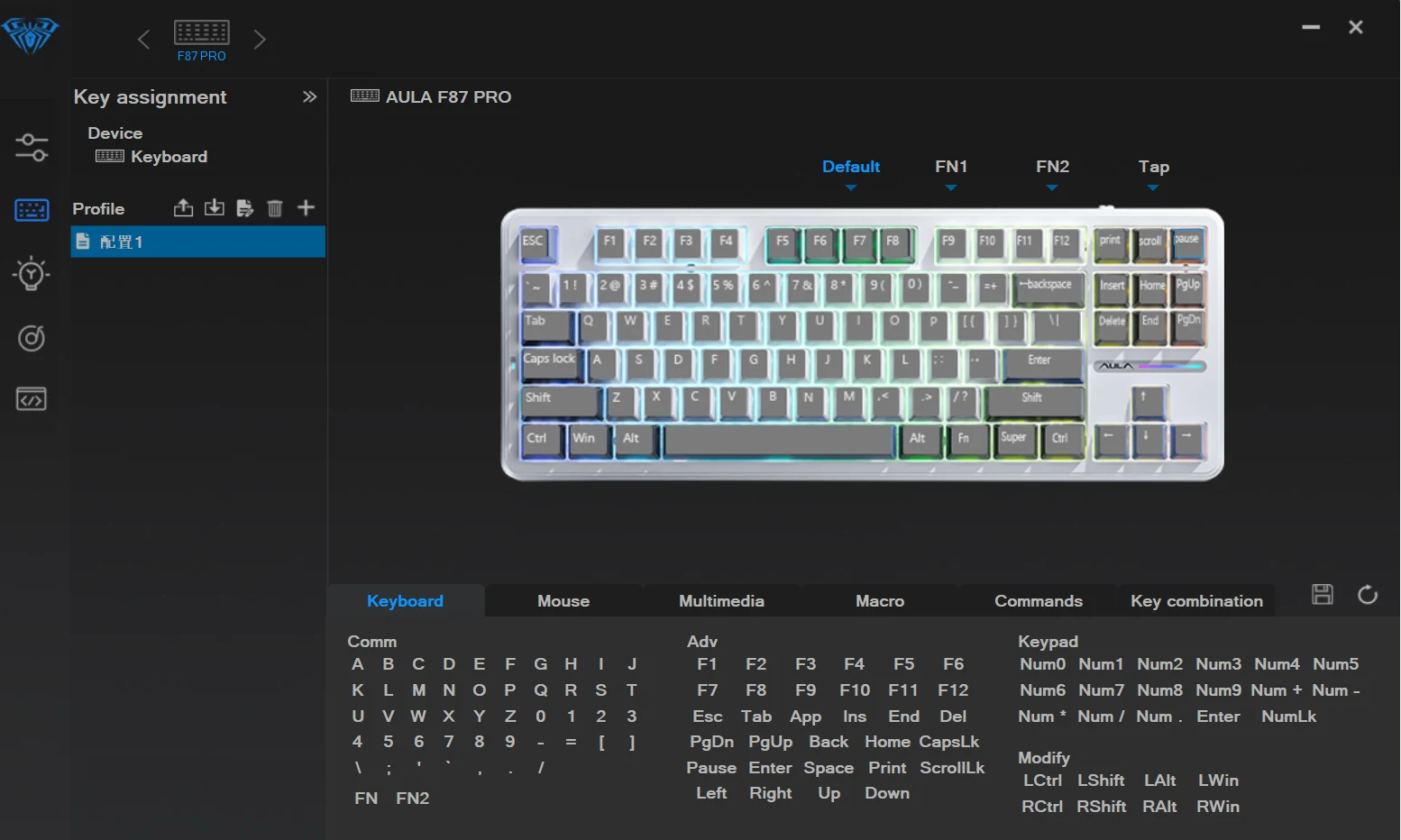
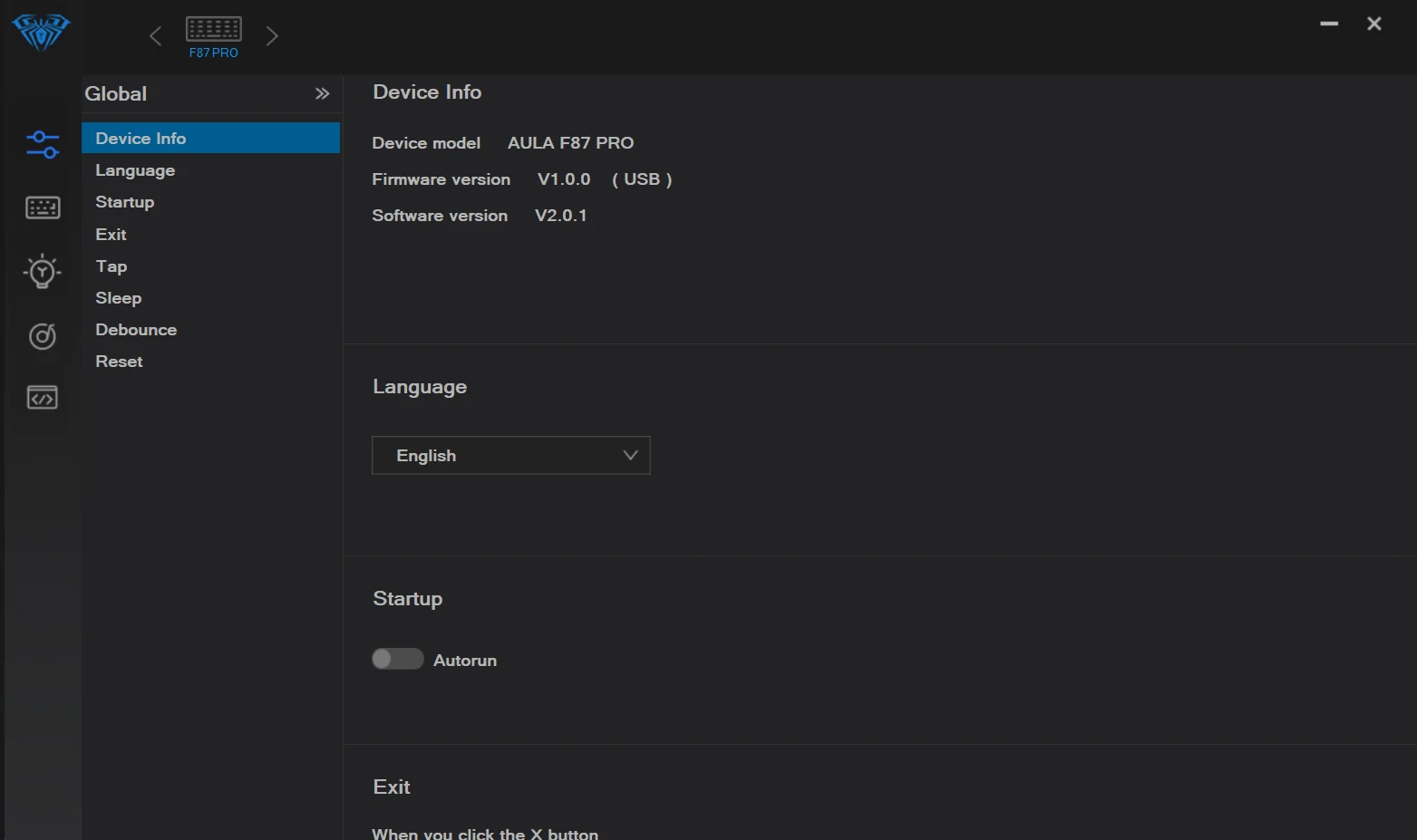
Fig. 02The official Key assignment and Global pages. Four layers, six action types and the app’s own settings all compete for the same attention. Official driver screenshots © AULA, shown for comparison; this project isn’t affiliated with AULA.
- “Did that save?”Writing happens through a floppy-disk icon in the corner, and nothing confirms it worked. New rule: changes are drafts until you press one labelled button, and every write is read back.
- Sliders for five values.Brightness and speed look continuous, but the keyboard only stores levels 0 to 4. New rule: show every step as its own button.
- Everything at once.FN2 and tap layers, macros, autorun and exit behaviour sit beside the settings people actually change. New rule: show only what I’d use, and leave the rest out.
- Icons without words.The left rail is five unlabelled icons. New rule: three named tabs, Lighting, Keys and Settings.
The first version looked finished. It couldn’t change a single setting.
On day one I asked for a web driver and got a convincing one: React, twenty lighting effects, a full colour picker, a typing trainer, a heatmap, even lighting synced to the screen.
None of it reached the keyboard. A debugging pass found six defects, three of them fatal on their own. The protocol had been guessed: the code expected a wired keyboard taking 1,032-byte messages, while mine was on a wireless receiver that only accepts 20-byte ones.
LessonAI will happily design the screen for a feature the hardware doesn’t have. Now my first question is: how do we know it does this?
Start again from what the keyboard actually does.
The second attempt started from the official driver. Claude read its configuration files and disassembled the program to find the commands it sends, then built a read-only page that asked the keyboard for its state without changing anything.
Every finding was marked confirmed, inferred or unknown, and only confirmed commands made it into the driver. That made it easy for me, without reading the code, to see what was safe to build on.
One rule came from a mistake. An earlier session asked me to test which effects turned the lights off, when the answer was already in the official config file. After that, anything code could check, code checked. I only tested on the real keyboard when there was no other way.
The official app shows everything. This one shows what I’d use.
Once the protocol was mapped, Claude could have exposed all of it. We went through it line by line instead, and each feature was a yes, a no or a later.
- Lighting: 14 effects, each with brightness, speed and colour
- The 7-colour palette every effect shares
- Key remapping on the default and FN1 layers
- Sleep timer and debounce
- Factory reset, with confirmation
- Export and import every setting as one file
- Macros — I don’t use them
- Per-key colour, and music-reactive lighting
- Game mode, the FN2 layer and tap layers
- Firmware updates — never
- Wireless settings — later; plug in the cable for now
Every cut was either a screen nobody would open or a new way to damage the keyboard. Firmware updates were the easiest no: they are the one thing that can turn a keyboard into a brick.
Nothing touches the keyboard until you say so.
Every change starts as a draft. The effect gets a lime “Draft · not applied” tag, edited keycaps turn lime, a counter shows how many changes are waiting, and a dot on the page tab follows you when you switch pages.
Only one button writes: Apply to keyboard. Discard puts everything back. Each key shows what it does now, what it did from the factory and what it will become, so you can check a change before you commit to it.
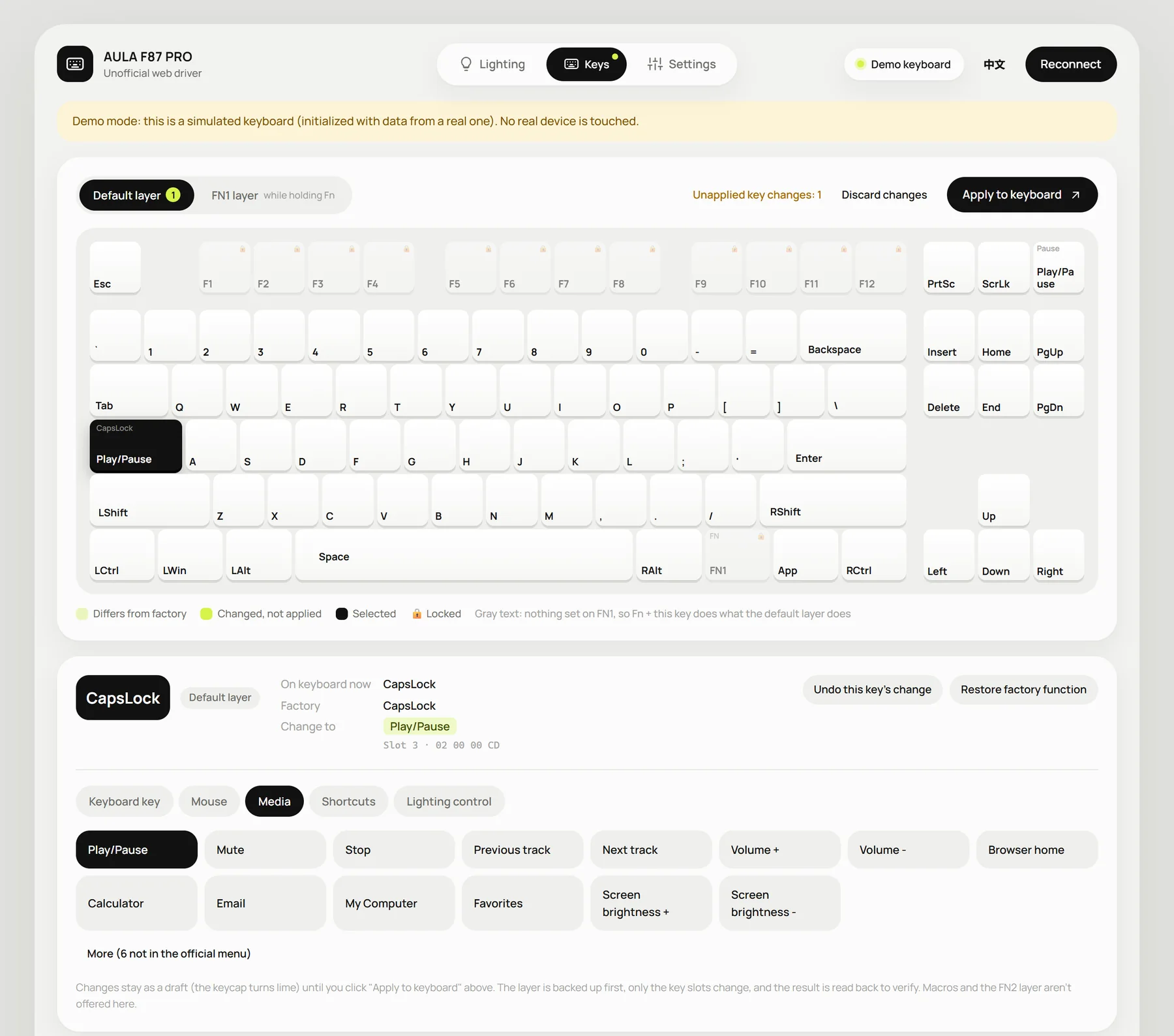
Fig. 03CapsLock remapped to Play/Pause, still a draft. Current, factory and new actions sit side by side, with the raw slot value underneath for anyone who wants to check.
Writing to hardware should feel safe, so the safety is on screen.
Each write re-reads the keyboard, backs up what’s there, changes only the bytes it needs to, then reads the result back to confirm it. Normally all of that would be invisible.
So the interface spells it out. The line under each Apply button explains the sequence, the Backups card keeps the last 30, and factory reset is red, backs up first and asks before it runs. If the keyboard doesn’t identify itself as an F87 PRO, the page turns read-only.
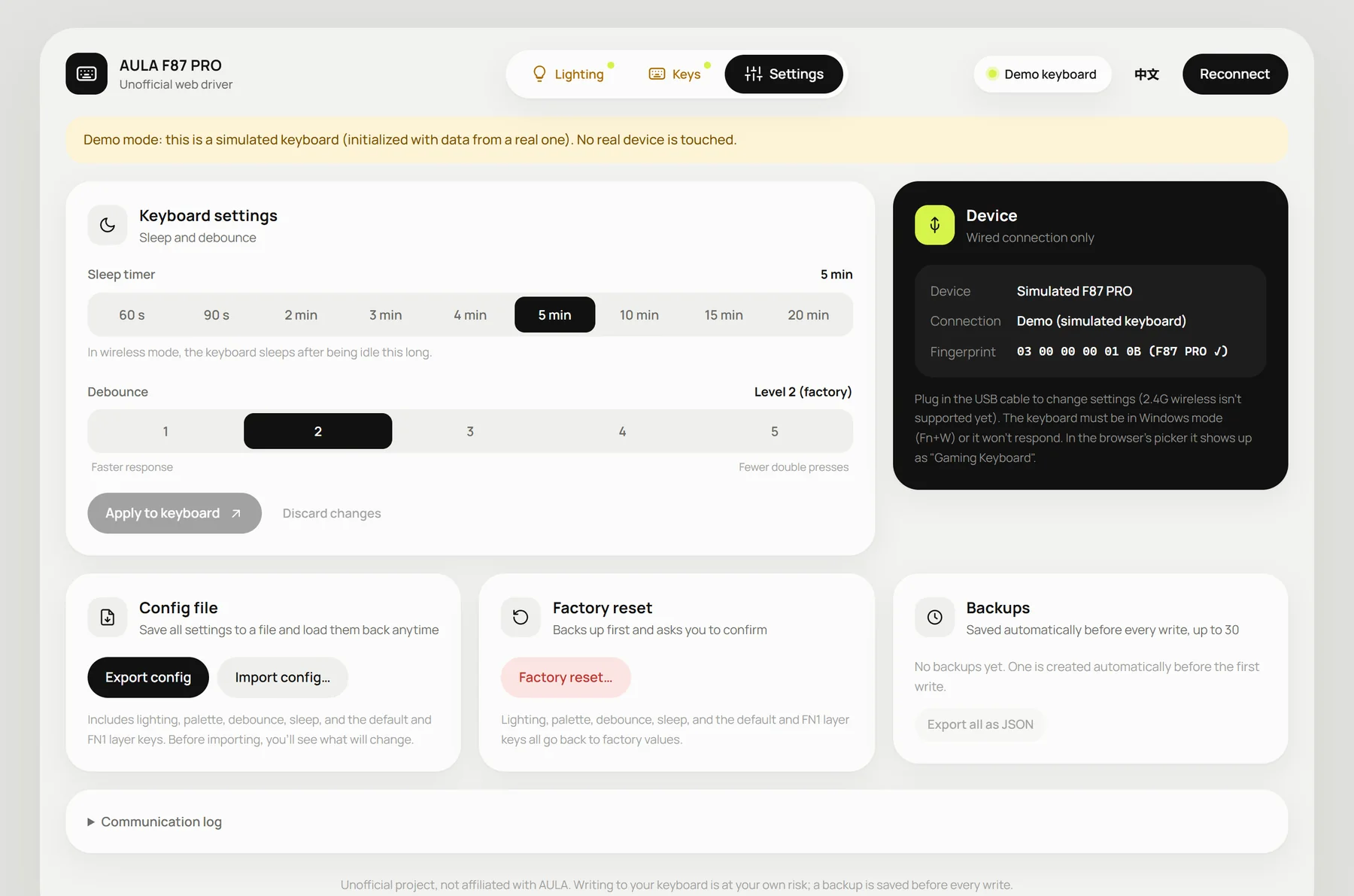
Fig. 04Settings: the fingerprint check, factory reset in red, and the backups list. The quiet text on each card says what will happen before anything does.
Open source, and you can try it without the keyboard.
The driver is open source under the MIT licence, in English and Chinese. Demo mode simulates the keyboard with data read from mine, so anyone can click through every screen, including you, right now.
The reverse-engineering notes, the official program and its manual stay out of the repository. Only the protocol summary is public.
- Looking finished isn’t the same as working.The first version had more features and better screenshots than the second. It just never worked.
- Ask for evidence, not confidence.Confirmed, inferred and unknown labels told me what was safe to design for, without my having to read the code.
- My job was mostly saying no.What to leave out, and what the software must never do, shaped the result more than any single screen.
Notes on working with AI, less polished on purpose.